





Eufy LED Bulb ( not for iOS )
Product ID: 177869392
Details
- Brandeufy
- Bulb shape sizeA19
- Light typeLED
- Special featureLED
- Wattage9 watts
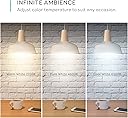
🎨3 tunable white color modes
💡9W energy-efficient LED power
📶2.4GHz WiFi smart connectivity
💡 Light up your life, your way—smart, simple, and stylish.
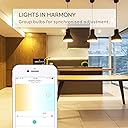
The Eufy LED Bulb is a 9-watt, 630-lumen smart LED bulb offering three tunable white shades (warm, pure, cool) for personalized lighting. It connects directly to 2.4GHz WiFi without a hub, controlled via the EufyHome app with scheduling and grouping features. Compatible with Alexa and Google Home, it delivers energy-efficient, customizable lighting ideal for modern smart homes, backed by an 18-month warranty.
| ASIN | B07177X95T |
| Batteries Required? | No |
| Batteries included? | No |
| Colour | Tuable White |
| Customer Reviews | 4.0 4.0 out of 5 stars (396) |
| Date First Available | 27 May 2017 |
| Item Package Quantity | 1 |
| Item Weight | 249 g |
| Item model number | AK-T1012121 |
| Luminous Flux | 630 lumen |
| Manufacturer | eufy |
| Part Number | AK-848061065664 |
| Power Source | Electrical |
| Product Dimensions | 6.5 x 6.5 x 14 cm; 249 g |
| Shape | Circular |
| Special Features | LED |
| Type of Bulb | LED |
| Voltage | 12 Volts |
| Wattage | 9 watts |
M**K
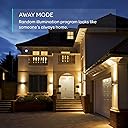
I'd been eager to start replacing CFL bulbs around the house with LED ones and since Eufy recently did a price drop on these tunable LED bulbs, I figured I'd try it out in one room and see how well it works. Installation was only marginally more involved than just screwing in the bulb, requiring the EufyHome app to pair the bulbs to your WiFi network. It only takes a minute or two for each bulb to pair - we did the living room ceiling in about 15 minutes between installation and pairing - not bad at all! Also went ahead and updated the bulbs' firmware, which is apparently a Thing we do now - its still endlessly amusing to me. One important thing to note - the bulbs can only pair to a WiFi router's 2.4GHz spectrum it seems. If you have a lot of devices on that spectrum - streaming devices, game consoles, laptops, etc. - be prepared for some interference or lag when controlling the bulbs through the EufyHome app or a smart speaker. For a lot of people that rent their routers from the ISP, most devices are defaulting to that spectrum upon connection unless you specifically choose the 5GHz one, if it is even available at all. Speaking of smart speaker, I was eager to see how well it performed when paired with my Google Home Mini. The pairing process is relatively painless - again, your smart speaker has to be on the same 2.4GHz spectrum as the bulbs, and you configure the speaker to pair with the EufyHome app - but my results are inconsistent when issuing a voice command. I could tell my speaker to turn all the lights on or off, and often it would only do some of the bulbs. Same with dimming. I am not sure if it is an issue with the speaker, the bulbs, the WiFi router, or how the apps communicate with one another. I'll be testing this out with my Eufy Genie later, to see if I can replicate the sporadic issues. Manipulating the bulbs directly, individually or as a group, on the EufyHome app did not seem to have any issues, so I have to think its something with the WiFi. Color-wise, you can select from three shades of white - cool blue, pure white, or warm white. Warm white is the closest to what I had with my CFLs, so that is what its configured for right now. Your mileage and lighting needs will vary - just keep in mind that shades like the cool blue white version are closer to what you may see with newer street light bulbs - very bright, but also can wash out colors if you're not careful. Dimming works about as much as you'd expect - it'll dim or brighten along a fairly broad range. One complaint I have is more geared towards the EufyHome app, and how it handles grouping the bulbs. You can group the bulbs very easily - but setting policies still has to be done on an individual bulb basis. What that means is that if you were to set an Away Mode policy - where the bulbs turn on/off at random during a set time period to simulate occupancy - you have to configure it by each bulb, rather than as a group. That can be a HUGE pain in the neck if you want different rooms of the house to light up as a part of a schedule. I imagine that a fix for this is somewhere down the line for the app, however, and its not something that would likely be a big deal for someone living in an apartment or townhouse. TL;DR Like - affordable, easy setup, has accessible 'fine tuning' controls, no extraneous 'hub' necessary to pair bulbs to WiFI Dislike - inconsistent smart speaker coordination (lag), only 2.4GHz (makes it subject to interference), EufyHome app doesn't yet allow schedules for grouped bulbs
P**R
This is a nice smart bulb. The main thing that I was interest in was the tunable feature, I was curious to see how well it would actually work, but I have to admit I really like it. I can keep it on Soft White most of the time so the room has a nice warm feeling and when I need more light I can quickly change it to Bright White. Most of the bulbs I use now are LED’s and while they have gotten much better at matching the warm color of an older incandescent bulb they still feel a little cold at times. Being able to adjust the color of this one really allows you to dial in what you like. The bulb is very solid and a little tall, like an older 100-watt bulb. If fit just fine in the lamps I tried, but would not work in a situation where you needed a compact bulb. It has the traditional incandescent shape and frosted glass appearance. It feels well made. The bulb comes with an 18-month warranty. Setup was very simple. Using the Eufy Home app you simply connect to the bulb, the app then provides the Wi-Fi settings you choose and the bulb is set up. It did notify me of a firmware upgrade that was available. I let it do the upgrade and the entire process was very smooth and painless. I have many smart devices at this point, and I have to admit this was the simplest set up of any of the devices. Once in the app, you can control the color and brightness, make it a favorite, set schedules, and add it to a group. All of this works as expected and was simple to do. The bulb also offers Alexa support, but does not offer Homekit support. It works both in and outside your home and no hub is required. All-in-all, I’m impressed with the simplicity of this smart bulb. It does exactly what it is supposed to, does it well, and was very easy to set up.
P**H
5 hours in. Were were excited to try with our new Alexa. Unpackage. Ack, needs an app? So, downloaded and installed the app. (Sigh, ANOTHER app?) Ok, whatever. Tuneable was sort of cool - cold blue to warm orange. Might have expected about 40 percent more color variance perhaps - I want to describe the tunability as "+-20% blue to yellow". Synced with alexa, worked with skill, could turn on and off. Did the firmware update. Tweaked the color through the app, and alexa could indeed turn on/off without a hub. Had it on for the last 5 hours. Thought I was nuts. It has flickered off, changed color, or gone off and on once an hour. One second dropping a "level"? of brightness, then next turning off for 3 mins, then turning on again randomly. Just now, turned off completely (with no influence from the app or spoken words - I was reading on the couch) and Alexa, when asked to turn back on, said ""Hmm, Den light (my name for it) is not responding". I liked the idea, didn't work for me. Returning both (one unopened) that I bought. Guess I need to buy a home hub - maybe the echo? - to make this idea work better. It's in a normal knob "flip once for on, once for off" lamp, if that matters. Actually, we were already talking about how to fix that lamp for this bulb - it stands 1.5-2 inches higher than a normal bulb, so it stood out above the shroud of the lamp. That problem's solved at least. I apologise, as my picture is not at the correct rotation, but you get the picture.
H**K
I finally took the plunge and bought myself a smart lightbulb to replace the normal LED one in my bedside table. I wanted to ability to turn it off without getting back up, and I have had great results with Eufy's motion sensing lights and plug-in lights, so I decided to use Eufy for my smart home products. Installation was very simple. I downloaded the app and connected to the lightbulb's wifi and was connected in minutes. From there, using the app, I was able to change the temperature of the light along with the brightness. It offers the option to save presets for various occasions, which is both useful and not as useful as you'd think (more on that later). The lightbulb does get warm, but nowhere near older incandescents and is a non-issue in my book. The price might deter some, but unless you want to spend potentially double on Philip's Hue line, Eufy is the best option. My main concerns have to do with the Eufy app more than the lightbulb itself. First of all, Eufy does not work with Apple's Homekit. I purchased a Wemo bridge to connect my Wemo light switch to Homekit in order to take advantage of Siri to control my room lights. I wanted to be able to use Homekit for all of my smart home needs, but with the Hue line costing too much for me and with Wemo not having their own light bulbs, I had to settle on getting Amazon's Alexa as a secondary smart home assistant. Second, the Eufy app is only useful when it's open. The Alexa app can connect Eufy's app and the lightbulb, but it cannot communicate with it beyond turning it on/off and changing the brightness. Alexa cannot access presets in the Eufy app and it cannot change the lightbulb's temperature via voice controls. In the Alexa app, you can create "routines" for your smart home, where certain voice commands can toggle different things on and off. The only interaction between Eufy and Alexa is again on/off and the brightness. If I want to take advantage of Eufy's presets, I have to go into the app itself, which defeats having voice commands to control the lightbulb. App issues aside, the lightbulb does what is advertised. If I had one thing negative about the lightbulb itself, it's that the lamp it's plugged into has to be on at all times, so I had to remove the switch on the lamp to prevent myself from turning it off. From there, I have to choose to use voice controls or open up the Eufy/Alexa app to turn it off. This is a minor inconvenience, but it's become a bit annoying to have to do either before I go to bed.
D**E
From the packaging, to the enclosed literature, to the bulb itself...Nothing can be said other than I am simply amazed by this bulb. While it is an LED light, the bulb itself is a very sturdy, heavy duty, quality, with surprising weight to it. It fits a standard socket, and screws in just like any other bulb, but that is where the similarities end. Once synced with the EufyHome app a whole new world is available at your fingertips. I want to touch on the EufyHome app a bit...Once your bulb is synced, you can turn the light on and off remotely, control the color of the bulb, which ranges from soft white to cool white, control the brightness of the bulb, from 1%-100%, set a schedule for the bulb to power on or off, add the bulb to a group of other bulbs to control all together, and even select from a handful of recommended/favorite bulb settings. I must admit this has been a pretty fun feature for my kids to play with, as they like to see the bulb change "all by itself" LOL... The real marvel of the bulb is being able to connect it to Amazon's Alexa without the need of a hub or any other device. All you need to do is simply add the EufyHome skill to your Amazon Alexa account, and then search for the bulb. It really is that simple... Once completed, the bulb, and all its functions are available from voice command. The ones that we use the most are "Alexa, turn on/off the downstairs light", "Alexa, change the downstairs light to cool/warm white", "Alexa, set the downstairs light to 10% - 100%". If you think my kids got a kick out of the app, you should see them control the bulb by "talking to it". I hope to add a video of this soon. Would I recommend this bulb, ABSOLUTELY I would. I haven't gotten a chance to test multiple bulbs in a "group", but I am hoping to be able to do that soon. My family and I are extremely pleased with this bulb, and would recommend it to anyone.
Trustpilot
3 days ago
1 week ago