Buy anything from 5,000+ international stores. One checkout price. No surprise fees. Join 2M+ shoppers on Desertcart.
Desertcart purchases this item on your behalf and handles shipping, customs, and support to KSA.
🖱️ Elevate your workflow with the mouse that masters every move.
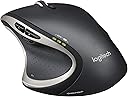
The Logitech Performance MX Wireless Mouse is a high-end, ergonomically designed wireless mouse featuring Logitech Darkfield Laser tracking for precise movement on any surface, a rechargeable battery lasting up to 6 months per charge, and a versatile dual-mode scroll wheel that supports both click-to-click and hyper-fast scrolling. With six customizable buttons and app-specific profiles, it offers unparalleled productivity and comfort for professionals and gamers alike. Though discontinued and replaced by the MX Master 2S, it remains a benchmark for performance and reliability.


| ASIN | B002HWRJBM |
| Additional Features | nv: Interfaces^1 x USB - 4 pin USB Type A | Movement Detection Technology^Laser | Features^Logitech Darkfield Laser Tracking |
| Antenna Location | Office |
| Are Batteries Included | No |
| Are Batteries Required | No |
| Battery Average Life | 6 months |
| Best Sellers Rank | #1,650 in Computer Mice |
| Brand | Logitech |
| Button Quantity | 6 |
| Color | black |
| Compatible Devices | Laptop |
| Connectivity Technology | USB, Wireless |
| Customer Reviews | 4.2 out of 5 stars 6,115 Reviews |
| Enclosure Material | Plastic |
| Global Trade Identification Number | 00097855060273, 04008928095104 |
| Hand Orientation | Right |
| Hardware Platform | Laptop, PC |
| Item Dimensions L x W | 5.1"L x 3.9"W |
| Item Part Number | 910001105 |
| Item Weight | 147 Grams |
| Manufacturer | Logitech, Inc |
| Mfr Part Number | 910-001105 |
| Model Name | 910-001105 |
| Model Number | 910-001105 |
| Movement Detection | Laser, Optical |
| Movement Detection Technology | Laser , Optical |
| Number of Batteries | 1 Lithium Polymer batteries required. |
| Number of Buttons | 6 |
| Operating System | Windows 7, Windows Vista, Windows XP |
| Power Source | Battery Powered |
| Range | 10.0 meters |
| Special Feature | nv: Interfaces^1 x USB - 4 pin USB Type A | Movement Detection Technology^Laser | Features^Logitech Darkfield Laser Tracking Special Feature nv: Interfaces^1 x USB - 4 pin USB Type A | Movement Detection Technology^Laser | Features^Logitech Darkfield Laser Tracking See more |
| Style Name | Modern |
| UPC | 097855060273 |
| Unit Count | 1.0 Count |
| Warranty Description | 3 year limited |
G**S
It is a really nice mouse.
My initial experience with a Logitech Performance MX mouse. First thing, it is a mouse for the right hand. Whose right hand I asked myself, surely not MY right hand. I wondered if the hand that it was designed for was an alien, with absurdly long triple jointed fingers and an unusually shaped palm attached to an arm that swept horizontally at an odd angle. I continued to gripe and complain to myself until the phone rang and I tended to business. Several minutes later I found myself back at the keyboard and mouse and realized that I had transitioned to the new mouse without thought. Yes definitely some alien brain manipulating handiwork here. To install it, I put the rechargeable NiMH AA battery into the battery compartment. The battery included didn't impress me much and it was also completely uncharged so I put in a better class of battery that I happened to have at hand. I did notice that the charger cord had a nicely sculpted 'grip' on it. That was a nice touch, along with the faux-leather pouch to contain the accessories: charger, charger cable and receiver extension cord. I was happy to see that the battery compartment has room to hold the *tiny* USB dongle that plugs into the PC and provides the wireless receiver. The 'UNIFYING' technology allows one single dongle to server multiple Logitech devices. As I already had an existing Logitech device and a dongle, I didn't bother to put it into the PC, I just left it in the mouse battery compartment and was happy that it had a safe place where it wouldn't get lost. The Logitech setpoint utility was already installed on my Windows 7 PC at work and it recognized the Performance MX right away. I noticed that *unlike* some other mice that need to be 'woken up' and discard the first few mouse movements, the Performance Mouse is instantly responsive. Maybe that is the 'performance' part along with the 1500dpi resolution and darkfield dual optic sensing. The mouse tracks smoothly and reliably. I was surprised that the extra buttons were well placed and not subject to unintentional activation. I had myself unintentionally become accustomed to the mouse in a short time. I used the mouse for the rest of the day, and before leaving work I packed it up to take home. After packing up the MX, I put my original mouse back on the desk and was shocked at how... dull and unresponsive the old mouse felt. The MX mouse installed into Windows 8 at home without a problem, and again was nice to use. The Logitech setpoint software running in windows 8 has some options that work differently than when it is run in windows 7. For example, the ability to assign window flip/ aero flip/ application switcher doesn't seem to work on Windows 8 when assigned to one of the additional buttons. I haven't contacted Logitech about this. In the end, I really like this mouse, it works well, it is cordless, responsive and comfortable. I might even get another one for work. It is a really nice mouse. Follow-up: since my initial review on January 4, 2013 it is 9 months later (Oct. 2013) and I'm still using this mouse. It is still a bit large for me and I tried a very similar styled 'marathon mouse' for smaller hands for a while but it just didn't perform as well. This performance mouse needs a recharge every couple of weeks but it is easy to recharge it by plugging in the USB cable. This mouse can be used while recharging, or left plugged in overnight. The mouse has held up well after lots of use, many hours a day with minimal signs of wear, a bit of shine on the left mouse button press area but all other parts showing no obvious signs of wear. The teflon slider pads are ample and in place. Best thing about this mouse: it tracks well, every button click registers when it should and it is responsive. Still a really nice mouse.
J**L
1st one lasted 2 years and died but I still love it.
RE-UPDATE 6/7/17: Unfortunately this mouse DIED ABOUT 3 MONTHS AGO AFTER TWO (2) YEARS OF DAILY USE so I bought the MS Mobile Mouse 4000 but I missed this Logitech Mouse because of all the features and comfort detailed below in my original review and update. This model Logitech Mouse was truly the best mouse for a desktop PC that I've ever owned. My only disappointment was when it started being erratic, skipping, and got so bad it was no longer usable. For travelling I also have a Microsoft Wireless Notebook Presenter Mouse 8000 and it is 7 years old and still going strong so the 2 year life of the prior Logitech Mouse is kind of disheartening. Hopefully this new one will last longer. For a more complete review keep reading. ORIGINAL REVIEW & UPDATE HERE: I just received this mouse today but my first impressions are very good. It does have a certain "feel" built in which I think has to do with the thumb position being more comfortable. For the record, I've been using what could be called a travel mouse, the MS Presenter 8000 which cost considerably more than this one but also has a built in pointing laser and other features. I originally used it just for traveling but then my MS desktop keyboard/mouse kit started giving me trouble like not receiving the mouse's wireless signal so skipping a lot. So I switched to the Presenter mouse but then begin to like it due to its small size. But I'm an old dude and my hand doesn't work as well as it use to so I figured it was time to get a more comfortable mouse and when I saw the reviews on this one I went ahead and ordered it. So far I love it, it's very comfortable in my hand and I like the idea of being able to change certain mouse buttons to something else like I did with the old MS mouse. For one I like the scroll button to be the "double click" as sometimes my left click finger doesn't cooperate with my brain and I have a heck of a time doing a double click. That problem solved with this new mouse I still haven't figured out a good use for the 6th button which defaults to "application switcher". Since I rarely use the Windows 8 Start page and prefer the desktop apps this isn't a good option for me and I wish it had more choices to choose from. I've settled on "minimized current window" until I find some other one I would use more often. It would be nice if I could use to go to my favorite URL or most commonly used program. If you need a new mouse and/or have carpal tunnel syndrome, arthritis, or some other hand problem this is the mouse to get. The extra $ it cost are well worth it and if your desktop is glass or a surface that a regular mouse doesn't like (like some wood grains) this is advertised to work on everything. The only "downer" from what I read is the battery life which lasts from only a few days to a week or so by some of the posters. We'll see how that works out. They should have used two AA or AAA type batteries so it would last longer. I also have the Logitech lighted keyboard and getting rid of one of the USB plugs was nice since I now have 3 items running on the "Unifying" receiver, the lighted keyboard, the mouse, and the touchpad which I rarely use. The keyboard will run for over a month on a full charge and the touchpad on standby about the same or longer so I wish that was true of the mouse. UPDATE 11/6/2016: Well I've been using this mouse quite a while now and must admit this is the best mouse I've ever owned or used. It's just so comfortable and for me fits my hand perfectly. I have arthritis in my hand and it doesn't ache from using this compared to others. Again, the ONLY con is the battery life but since it can still be used while charging that isn't a big deal. The micro USB plugs in the front end of the mouse on an upper angle which keeps it from dragging on the desktop so you barely knows it's there. Buy this mouse, you won't be disappointed. I also have the companion keyboard and it's great too with it's backlighting and much longer battery life.
H**K
Seamless transition from MX Revolution
The only reason I gave this mouse 4 stars instead of 5 stars is because of the price. The manufacturers suggested retail price of $80.00 (plus tax, free shipping with Amazon) is way too expensive for a mouse regardless of its functionality. I purchased the Logitech Wireless Performance Mouse MX for PC from Amazon and I have been using daily since July 1, 2011 (about 10 days now). I pre-ordered the Logitech Wireless MX Revolution way back in early 2006 and it was the best mouse I ever owned. I loved it so much that I disassembled the mouse to replace its battery with a new one when the old battery no longer accepted a charge (the old battery lasted until October 2010). I really loved that mouse. My nephews were playing near the pc and leaned into the wireless USB receiver that came with the MX Revolution and cracked it, so the MS Revolution was no longer detected by my pc. That receiver is about one and one-half inches long and really stuck out from the pc. I looked for a replacement for the receiver on the internet when I considered the newer Logitech Wireless Performance Mouse MX. I was aware of the Logitech Wireless Performance Mouse MX from when it was first released but I never considered it because I loved my MX Revolution and because some reviews made the Performance MX sound like something I might not enjoy. In fact, after 10 days of ownership I find little to substantiate those negative reviews. The Performance MX mouse is superb and does all that the MX Revolution did. I do not use CAD software so I cannot comment on how the Performance MX applies there, but I use Microsoft Word, Publisher, and Excel and Adobe Photoshop and Illustrator, and Mozilla Firefox on a near daily basis. The Performance MX is wonderful in those applications, as if I never changed my mouse. Here were my concerns before purchasing the Performance MX: "One-Touch Search" and "Application Switcher" buttons. With the MX Revolution I used the "One-Touch Search" and "Application Switcher" buttons constantly. The MX Revolution had a button on the top just below the wheel that served as the One-Touch Search button. That button on the Performance MX is now a "gear shifter" that changes the wheel from click-to-click like a standard mouse wheel to a wheel that spins freely so that you can move up and down long pages quickly. I never used the freely spinning wheel feature on the MX Revolution anyway because I use a Firefox add-on called FireGestures which is far more useful and efficient for my purposes. However, the Performance MX has a button just below the forward-back thumb buttons (it is labeled as the Zoom button - a useless feature) that I easily reconfigured via the SetPoint software to be the One-Touch Search button. I spend several hours per week browsing the web with Firefox and I use the "One-Touch Search" feature of the mouse very heavily - I am constantly highlighting the name of a file in Windows Explorer or some text in Word or some text on a webpage, and I simply press the "One-Touch Search" button on the mouse which automatically opens a new tab in Firefox and performs a Google search of the highlighted text. That feature is crucial to me and the Performance MX does it well. The Application Switcher was actually a thumb-wheel on the MX Revolution - a wheel the Performance MX does not have., However, the Performance MX has a button in a location that the MX Revolution did not have - the thumb-rest area of the Performance MX is a button. You actually press down on the black rubbery area. The photos of the Performance MX shows what looks like a tiny button with little white boxes on the thumb rest area. That little thing is not actually the button - the entire area is. Ergonomically, the Performance MX is slightly larger than the MX Revolution. I have a very large hand so I really appreciate the added size, as slight as the increase is. The Performance MX feels slightly lighter too. To nitpick, the little button below the forward-back button could have protruded a bit more to give a greater tactile feel to its location. The wheel is angled towards the index finger. It is not perpendicular to desk top, but perhaps on a 75 degree angle. While that angle makes for easy and comfortable wheel scrolling it took some time to adjust to clicking the wheel since the wheel needs to be pressed in at that 75 degree angle. Nitpicking over. The texture of the Performance MX feels indistinguishable from the MX Revolution. The Performance MX's tiny Unifying Receiver is a great upgrade over the long and protruding receiver of the MX Revolution. The Performance MX uses an easily replaceable 1900 mAh AA NiMH rechargeable battery - which comes included in the packaging - and this too is a great upgrade over the not-meant-to-be-replaced battery of the MX Revolution. Also included is a rubberized pouch with zipper to hold the USB extender cable (in case you want to place the little Unifying Receiver right on your desktop), and a USB-to-Micro-USB cable and a USB-to-wall-outlet adapter to recharge the mouse. The USB-to-Micro-USB cable can also be used directly plugged into a USB slot on the pc to recharge the mouse. Recharging can be performed while using the mouse like a wired mouse in that fashion. I charged the mouse overnight when I received it 10 days ago and I haven't had to recharge it yet, although the battery indicator is showing almost no charge right now. Inside the battery compartment there is a small compartment meant to hold the Unifying Receiver for transportation. So you pop the Unifying Receiver in that compartment, pop the mouse into the case with the recharging cable, and you can take your mouse to work on a different computer. I use the Performance MX on a 12 inch cloth-over-rubber SteelSeries QcK Gaming Mouse Pad which you can find here on Amazon for about $10. The mouse glides perfectly across the surface and my wrist really appreciates the ultra-thin pad. I bought that mouse pad for the MX Revolution because that mouse worked erratically if used directly on wood laminate and on the plastic glossy mouse pad that comes with Dell computers. The Performance MX seems to work just fine regardless of the surface. I've even used the mouse on my pant leg, the arm of my chair, and the top of the computer tower for brief moments and the Performance MX worked just fine. Overall, I am extremely pleased with my Performance MX mouse and I consider it a very worthy successor to the MX Revolution.
D**N
Logitech's Mighty Mouse
I've been a fan of Logitech since I bought my first mouse and keyboard from them (MX3100). Since then they have continued to keep my interest (and my patronage) by constantly developing new and innovative products. The dependable quality of Logitech devices has been the main reason I stick with them and the new Performance MX Mouse continues this trust. I wasn't sure if this mouse could hold a candle next to my beloved MX-1000, which had finally retired itself with a worn down right-click button. However, the Performance MX surprised me. Ergonomics: The first thing I noticed was the comfort - this mouse fits like a glove in my hand and it's so light it feels like I'm moving a cloud around. The rubberized thumb rest is just that; an excellent resting place for my thumb. My fingers do not get cramped or ache even after hours of use, and I should know about this since I'm an illustrator and spend many hours on the computer. Great Features: I wasn't fond of the scroll wheel placement on the Revolution, but with the Performance MX this has been replaced by two Back and Forward buttons. An awesome feature for me because I'm constantly going back and forth on web pages checking out my work. Right below these buttons is a single Zoom button, which I changed in the settings to refresh the page (Ctrl+F5). On the very bottom of the rubberized thumb rest area is a small icon, which I did not see at first and so when I inadvertently pressed down on this all my open programs and windows zoomed out and I was like 'Woah!' I could now pick whichever window I wanted by clicking on it and it would zoom back in to normal size. This is a great feature! The main scroll wheel on the top can move like greased lightening, but since I'm old school I preferred the simple click-click scroll of the older mouse. Thankfully Logitech must have some old-fashioned nerdiness in them, too, because you can press the small button behind the scroll wheel and it turns into the click-click function I love. Kupo! Having an On-Off switch on the bottom is a must for any cordless mouse and naturally the Performance MX has one. Unifying Receiver: I was really impressed with this new innovation. Not only is this thing tiny but it will work with all my wireless devices (negating the hassle of using multiple USB receivers). I have an old Logitech MX3100 keyboard and it worked without even a hiccup once I plugged the receiver in. It's also nice to have the receiver out of the way and not sticking out of the front of my PC's IO port. I just used a Logitech USB extender I had lying around, plugged it in, and have it sitting on the back of my computer desk. Nice and neat. Battery: At first I was a bit puzzled about the little black leather bag that came with the mouse. Not being one to read the manual it took me a few minutes to figure out that it contained the "extras" - a new slimmer version of the USB extender, a nice long USB cord, and the square plug that fits into the wall outlet. I thought it was a nice touch on Logitech's part to put these extras in their own little zippered bag. The battery in the mouse lasts about as long as the one in my old MX-1000 did. And since it takes AA rechargeables I can use my Eneloops with it as well. This is an exellent plus in my book because now there won't be any issues with the battery dying and me not being able to replace it because it's part of the mouse. I also like how you can still use the mouse while it's plugged into the wall charging. As always Logitech's presentation and packaging of their products gets kudos in my book. You don't need to be Superman to rip the thing out of some plastic cocoon; the box comes with a very easy to open lid and you can even keep the box to store the mouse in (if you so desire). All in all I believe Logitech has created their own version of the Mighty Mouse here (at least for us non-Mac users) and I can't recommend it enough. I know the price is a bit more than other wireless mice, but you're getting the Logitech brand and quality and the Performance MX more than lives up to it's price tag.
M**O
Excellent mouse. I highly recommend this mouse.
What an excellent mouse. I've been using this mouse at work now for over a year. I love it. The mouse is heavy. Perfect. The feel is smooth and it just feels like quality. The battery life on this mouse is a bit disappointing. When I originally got the mouse I found that the battery might last 6 or so days. So you would start on Monday and get a low batter warning next Monday. This is assuming you don't use the mouse on the weekend like I did since this was used at work. I turned the mouse off everyday before leaving the office. But battery life was way below the 1 month Logitech mentioned. I did reach out to them and they did replace the mouse. I noticed the replacement mouse had an Eneloop battery. The old mouse had a different battery, I can't remember the manufacturer but it was not an Eneloop. Battery life was better in this case. Roughly 3 weeks but still below the 1 month I hoped for. I didn't bother Logitech about this because the mouse is excellent. I usually let it charge between lunch breaks so charging times weren't an issue. I cannot stress how amazing the scroll wheel is on this mouse. I now expect that any mouse I use can scroll like this one. I can switch from regular speed scrolling to super fast inertial scrolling at the press of a button. I don't coddle this mouse when using the button either. I just press it when I want to stop. Still works great. I loved this mouse so much that I got another one for home use. It's the standard I have for mice. My work mouse has a small grease spot from my index finger sitting on the same spot for over a year. And the logitech logo on the back of the mouse is fading. I look at that stuff with pride. This is a work mouse and it is excellent. I'm happy it works on glass. It is another feature I expect from mice. The forward and backward buttons are the buttons I use the most besides the obvious ones. I did program the Application switch button to the Start Menu for use with Windows 8. The mouse works great. I use it primarily in Windows but also use it on my Mac. I can't speak for how this mouse compare with the old MX because I did not have one. But I do recommend it whenever possible.
S**A
Expensive but great mouse with one minor flaw
Background: I use to own a Logitech G7 Laser Gaming Mouse but replaced it with the Performance Mouse MX after breaking the dongle for the G7 accidently. I have been using it for about a year and a half now so I thought I'd leave some feedback. Most of this review is probably comparing it to the G7 I had previously had. Positives: Design - Initially, it looked kind of odd compared to my G7 because of the shape of this mouse. However, I gave it a few days and it felt fine after adapting to it. If someone is not used to this design, it will probably feel awkward at first until that person adjusts. Darkfield Technology - I have to say that this technology is amazing. I use to need a mouse pad for using my mouse on a glass surface but now it isn't needed at all. However, a warning to future buyers, it is not perfect on all reflective surfaces. Sometimes it will not be as precise as it would be on mouse pad. Small Unifying Sensor - Save space as I can sync my keyboard and my mouse to it. It is also significantly smaller than the old dongle I had for the G7 making it nearly impossible to break. I appreciate this change as the long dongle for my old mouse broke because it was too big and often collided with objects when I carry it around. Easily customized buttons - Just get the Logitech SetPoint software and you can change the keys around to your liking. There are many different options for the few buttons you can customize such as the thumb button. Responsiveness - Just as responsive as a wired mouse would be. No issues with it at all. Neutral: Battery Life - Under heavy usage, this mouse dies too quickly. You then have to use the micro USB charger which plugs into the front of the mouse (effectively making it a wired mouse although super uncomfortable). The wire itself is also a pain to plug in for me. On the other hand, since this mouse uses AA batteries - you can easily swap batteries if you have a spare. Negatives: Side Scroll - Incredibly awkward. It is a complete downgrade from the one I had in the G7. They made the scroll button only tilt slightly while you side scroll. While they have made side-scrolling quicker, they have may the process very uncomfortable. Not a huge negative but, nevertheless, you might want to take note of this if you side scroll a lot. Price - On the expensive side of most mouses. This mouse doesn't have a real defining feature that makes it worth the price in my opinion. I suppose if you really needed the Darkfield technology at regular size then Logitech doesn't leave you many options. The only other Darkfield mouse is the Anywhere Mouse MX but it is too small. My previous Logitech G7 was expensive as well but that was laser gaming mouse with many customizations available. Conclusion: The Logitech Performance Mouse MX is a great and comfortable mouse to use. Changing from a Logitech G7 Laser Gaming Mouse to this, I don't miss much except the awkward side scroll. However, the addition of Darkfield technology and a unifying sensor are both very useful. If you don't mind the expensive price tag, I wouldn't hesitate to recommend this mouse. UPDATE (12/26/13): My mouse seems to have developed the double-click issue that many users here are talking about. Unfortunately, Logitech is not willing to replace the device.
C**Y
BIG HAND LOVER
I was looking for a wireless mouse for my mac, and could not find the right one for quite some time. Finally, after deciding to spend the money, I found the best mouse I have ever used. The mouse is definitely worth the money!! It was so worth the price because I know I will never have to worry about being a replacement for this mouse for a long time! PROS- 1. PAGE FORWARD/BACKWARD- The 2 buttons above where your thumb would go are for going back and forth between different web pages. The allows for super quick web surfing and saves a lot of time. It took me a while to gets accustom to these buttons because they have not been on any other mouse I have even bought. But, I find myself using them constantly. 2. ZOOM. Below the page forward/backward button, there is a zoom in and out button. You just push it in and use the scroll ball to find the perfect zoom. Definitely a cool feature. 3. ALL DOC. The black pad where you thumb would go can be pressed in to show you all your current documents that are open. This is a great feature because if you have the internet open, word, and some other documents, it can be annoying constantly searching for what document you need to pull open. When you press this button in, all your open documents will space out on your screen and you can pick which document you want to be looking at. 4. SCROLL. The button below the scroll ball can be pressed in to allow 2 different speeds of document/website scrolling. The first speed is a slower to normal speed that must of us are used to. The second speed pretty fast. This is like a hyper scroll that allows for fast web browsing. Pair this scroll speed with the page forward/backward button and you got a web searching monster mouse! 5. SIZE. Possibly my favorite thing about this mouse. Every mouse I have used before has felt too small in my hand. The mouse is the perfect mouse, as my palm and sausage fingers fit perfectly on it. This mouse just feels like your hand should be on it. The design of the mouse is awesome great. There is a great slot to rest your thumb in, which allows for maximum comfortably and control. CONS- 1. PRICE. This mouse may be a little expensive as it is around 75 bucks. But I feel like the price is actually pretty good for what you get. The MX is definitely worth the price. I believe this mouse compares to other performance mouse's that cost 100 plus. I would highly recommend this mouse to anyone that is willing to spend the extra money. This will be the last replacement mouse I ever buy because it is just perfect! Great for someone with bigger hands! It is so comfortable and document/website friendly that will not disappoint you. This mouse holds a charge for a long time. I have had the mouse for about 6 months and probably only charged it twice (using my computer atleast 10 hours a weeks). Try this mouse, you will be glad you spent the extra bucks!
M**G
Mixed feelings. Good for the right price
I've got some mixed feelings about this mouse. it's a pretty good mouse, and I really haven't found anything out there that I like better. But every great feature is slightly tarnished by a goofy design choice or avoidable flaw. So for half of MSRP, I'd buy it again. But full or even 3/4 of MSRP? The flaws are enough to make me pass on it. The mouse itself feels great. I've always preferred asymmetrical mice, and this one is amazingly comfortable. I've many different mice over the years, most recently the the Logitech M705, G400, M505, and the MX 518, and this one feels the best of them all. That being said, some of the thumb buttons are unreachable, hence useless, from a standard grip. The forward button is so far forward on the mouse that my thumb would need to be an inch longer to use it. I don't use most of those buttons (except the application switcher, which is both reachable and helpful) and so this doesn't really affect me, but you may feel differently. The best feature on this mouse is the Hyper-Fast scroll wheel. Hyper-Fast scrolling is the best thing to happen to scrolling since the scroll wheel itself. Need to get through hundreds of pages or thousands of rows in a spreadsheet? The old way was scroll-scroll-scroll-scroll-rest finger-scroll-scroll-scroll. With the Hyper-fast wheel, one quick flick and it will keep scrolling at a blazing speed until stopped. With one spin I was able to move through 6000 rows in Excel in under 10 seconds. If you want to turn off hyperscrolling then you can click the button on the top to turn it back to a normal scroll wheel. Personally I leave it on all the time and use my finger as a "brake" when needed. But even hyperscrolling is not without flaws. With Smooth Scrolling enabled, the page had a tendency to jump around quite a bit. The scrolling seemed inconsistent; sometimes it stopped in the right place, other times it didn't, other times it seemed to scroll on it's own. It was anything but smooth. I've had this problem on two different computers with both this mouse and the M705 (another hyper-fast scroll mouse) on several computers. At the suggestion of the Logitech forums, I switched it off in the Logitech SetPoint settings, which seemed to resolve the problem. The most awful part of this mouse is the battery. My M705 is still running on the same batteries I put in two years ago. It currently sits in my desk drawer because the rechargable battery in this unit dies - WITHOUT WARNING - every !#@$^! few days. The low-battery warning that appears on the screen with every other wireless logitech mouse or keyboard I've ever used doesn't seem to work with this mouse. It does have a low battery indicator on the mouse, which is <sarcasm> very helpful </sarcasm> considering it's located right below the palm of my hand. The battery life on this thing is terrible, as is the recharge time. The cord isn't long enough for me to use the mouse while it's charging, so I keep my old trusty M705 in my desk to use while this one charges. The M705 is basically my Monday/Thursday mouse. For fifty bucks (sale), I'm living with the flaws and would probably buy it again. It honestly feels great in the hand, much better than the smaller m705, and those are the only two options that Logitech offers right now for wireless, contoured mice with the Hyper-fast option.
わ**こ
最高に持ちやすい
これより新しいMX MASTERが出ているが、持ちにくいので、左手用のサブ機にしかならなかった。仕事で一日中持っているので、このマウスが最高に操作しやすいし、違和感や疲れが少ない。
N**O
Opinion de entrega y periferico
Entrega: Rápida, confiable, segura, el pedido me llego antes de lo esperado y en buen estado, gracias. Opinión: Es un excelente mouse, un poco grande a lo esperado (pero los botones son grandes, si eres de mano pequeña aun así te servirá) tiene muchas funciones a programar para su uso (descarguen el programa de la pagina oficial logitech), lo recomiendo al 100% para aquellas personas que se dedican a trabajar en diseño, programación o están todo el día en la computadora, es muy confortable y ergonómico (tu mano y muñeca te lo agradecerán), cumple con todo lo que promete en las reviews que dan. Aparte los materiales se ven resistentes y elegantes, así que no solo es funcional si no también impresiona con su aspecto.
A**T
It's a good mouse for users who use mouse for cursor control
Darkfield sensor allows you to use the mouse on any surface, I am using it on fully transparent glass table. It's a good mouse for users who use mouse for cursor control. Forward button may be little difficult to reach for someone with short thumb. Some reviews have mentioned mouse double clicks with a single click but have not noticed that as yet on mine.
C**X
Excellente souris
La souris Logitech MX est tout simplement géniale. Elle offre une excellente prise en main et est très confortables. Les touches raccourcis sont parfaitement positionnées et facilement reconfigurables au besoin. La souris est très précise autant sur un tapis de "Gamer", une planche de mélamine ou sur la jambe de l'utilisateur. Je l'utilise régulièrement pour des présentations debout et je peux interagir sur l'écran en glissant simplement la souris sur ma cuisse et sa fonctionne parfaitement. Sa forme offre une prise ferme permettant son utilisation en se déplaçant sans risque de l'échapper. Elle est excellente autant pour le travail de bureau quotidien que pour le "shooter gaming". Je la recharge environ une fois par semaine en la laissant allumé toute la journée et l'utilisant environ 4 heures par jours. Sa prise de recharge permet l'utilisation sans contrainte lorsque le fils est branché. Je recommande absolument cette souris de qualité à tous. Livraison rapide avec Amazon Prime.
N**Z
Calidad, ergonómia, versátil y diseño.
Es perfecto para trabajar ya sea de editor, diseñador, oficinista, gamer, etc. Gracias a su diseño ergonómico no te cansas de usarlo por horas. Y muy buena calidad de materiales y de igual manera viene con su cable para recargarlo lo cual está super bien, así no tienes que cambiar de baterías.
Trustpilot
2 months ago
2 weeks ago